What's an easy wishlist app for my kid's birthday that grandparents can use?
The short answer
Make a visual list together, add photos and links from different shops, approve your kid’s hints and share one link with grandparents.
- Kids help choose
- Different shops
- Parent-approved hints
- One link for family

I've had plenty of duplicate gifts and gifts that never got used. The part that stayed with me wasn't just the present itself. It was everything afterwards: finding out whether a shop would take it back, making another trip, keeping track of store cards, and wondering where to put things until I sorted them out.
I was glad those gifts eventually went to good use. But I kept thinking: couldn't we make the choosing easier in the first place?
That's why this question makes so much sense to me: what's an easy wishlist app for my kid's birthday that grandparents can use?
My answer is My Gift Hint—the app I created for families. It lets you keep gift hints from different shops together, with photos and links, then share a list with relatives. Your kid can help choose things they would really love and use, while you stay in charge of what gets shared.
But the useful part isn't simply having another app. It's giving your kid a way to show you what they mean, without making you remember every toy aisle conversation.
Can my kid help make a wishlist without expecting everything on it?
Think of circling favourites in a toy catalogue. A visual wishlist can bring that same choosing-and-looking-back feeling online—without keeping the ideas inside one shop's catalogue.
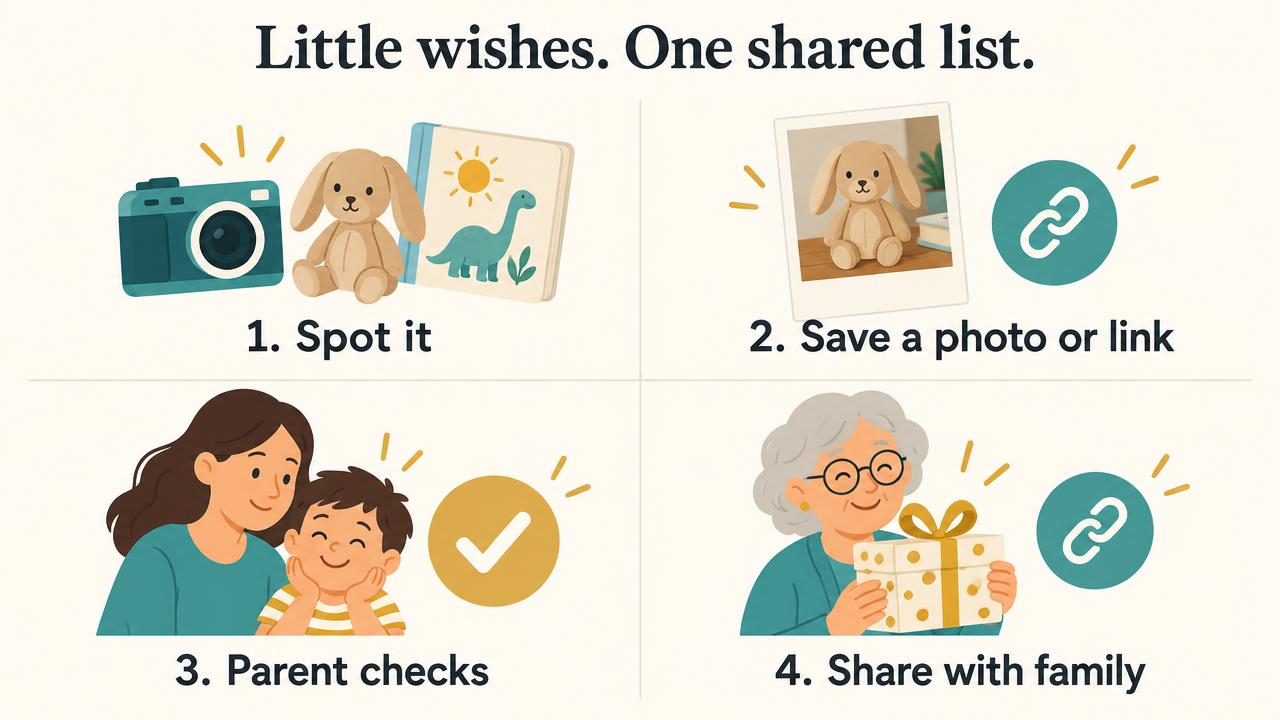
Younger kids can point while you scroll together. You can photograph something they spot in a shop, or help them choose the exact version of an item. Older kids can add their own gift hints if you turn on profile access.
The important sentence is: “We can put it on your wish list. That doesn't mean we're buying everything on it.”
Parents raise this distinction on Reddit too: a wishlist can start sounding like a list of demands unless everyone understands that wishes aren't promises. 1
Two questions can help keep the list thoughtful:
- “What would you like to do or play with this?”
- “Is this still something you'd really love and use?”
Revisit the list together before sharing it. Interests change, and an exciting shop-window find doesn't have to stay on the birthday list forever.
Is there an app where my kid and I can make a wishlist, but I approve the ideas first?
Yes. In My Gift Hint, you can build a list together using your own account. If you want your kid to add ideas independently, you can turn on profile access and set their PIN.
Gift hints they add need your approval before they appear on the shared list. You can check the item, the shop link and the details before family sees it.
You don't have to hand over the whole decision. Let them do the fun part—spotting something, picking a colour, choosing a favourite—and keep the final check with you.
How can my kids make wishlists with items from different shops?
You don't need to start a separate list for every retailer. Here is a simple way to set up one in My Gift Hint:
- Create your kid's profile and a birthday list. Keep the title clear so family knows which occasion it's for.
- Add a gift hint. Paste a product link, or add a name and a photo of something you've seen while shopping.
- Include the details that matter. A size, colour, shop name or short note can help relatives choose the right version.
- Add the next idea from another shop. Keep books, toys, clothing or an experience together rather than sending separate messages.
- Check your kid's list—you can keep it private or publish it. When you're ready, publish the list and share its link. Review and approve all gift hints your kid added before guests see them.
- Give your kid a few categories to explore. You could suggest four or five, such as books, something to play with, self-care, an experience and giving to others. Let them choose their favourites rather than filling every category. It could be lovely to include one optional donation hint, too—for example, a donation to World Vision to help a kid in need. Even a small donation can contribute to that work.
For example, a list could include a book from an independent bookshop, a board game from a toy shop and a helmet from a sports store. That's an example of how to organise the ideas—not a shopping list every family needs to copy.
This is a real parent question, not just an app feature looking for a reason to exist. One Reddit parent asked for a wishlist website that could link products from multiple stores for upcoming birthdays and Christmas. 2
Keep those little “I like this” moments in one place
You don't have to remember the name later or search through a trail of messages. A photo or exact link gives the idea a home, ready for you to review together.
How do I make Christmas lists with clickable links and photos?
Use the same approach for Christmas: create a Christmas list, add the exact product links you want to share, and include photos where they help explain the choice.
A parent on Reddit asked almost exactly this: an app for kids' Christmas lists with specific links, photos for the “I want this” moments in shops, text-only ideas and family sharing. 3
A good photo shows which thing your kid means. The link takes family to the shop. A short note fills in what the picture cannot tell them, such as the size or preferred colour.
If you've added only a photo, include the shop name or a helpful description. It doesn't automatically tell someone where to buy the item.
Can grandparents use the list without downloading an app?

Grandparents can open the shared list in a web browser. There's no app download or account signup needed to view the published gift hints, and it's free to use.
They can browse the photos and links, then tap “I'll get this” if they'd like to reserve a gift. That lets other guests know someone's getting it and helps avoid double-ups.
Reserving isn't checkout. They choose how to shop: follow the link and buy online, or visit the shop if it's nearby. Delivery, click-and-collect or taking the gift home works just as it would with any other purchase. My Gift Hint shares the ideas and reservations—it doesn't handle purchases or deliveries.
If nothing on the list feels right, the kid's favourites can offer another hint. If they've named a favourite gift card, that could be an easy choice—or their favourite books, hobbies or interests might spark another idea. There's no pressure to choose an exact item from the list.
One parent looking for a family wishlist described a relative who could use email and click links, but wouldn't be comfortable with a complicated shared document. 4
I wouldn't promise every grandparent will find every website effortless. But a clear list, recognisable photos, a few favourites and one shared link are a simpler starting point than shopping instructions scattered across messages.
Can grandparents overseas buy from my kid's list?
You can share the same list with family in the US, the UK, Australia or elsewhere. Where they live doesn't stop them opening your link.
The retailer's delivery rules are the part to check. An overseas grandparent may be able to order from an Australian shop for delivery to you in Australia, or the other way around. Availability, payment options, shipping and delivery times depend on that shop—not My Gift Hint.
If a gift needs delivery, arrange the address privately with the giver. Don't put a home address into a publicly shared gift note just to make shopping easier.
What do I say when family asks what to buy?
Keep it warm and leave room for their own ideas:
“We've put together a few things the kids would really love and use. Here's the list if you'd like a hint—there's no expectation or pressure to buy the exact things on it. If you do choose something, please tap ‘I'll get this’ so nobody doubles up. Thank you!”
A wishlist is helpful information, not an instruction to spend money. That is worth saying to your kid and to the people you're sharing it with.
Does it cost anything?
My Gift Hint is free to use—no ads, no hidden charges. Any gifts family chooses to buy are purchased separately from the retailer.
Before you send the link
- Check the ideas still suit what your kid enjoys.
- Approve any pending gift hints you want guests to see.
- Check links, photos, sizes and colours.
- Include a few different price points, without making buying feel expected.
- Publish the list and open the shared link yourself.
- Include your no-pressure message.
Let them help choose. Keep the sharing simple.
You don't need to turn birthday planning into another big job. Let your kid show you the things they would really love and use, keep the useful details together, and give family one place to check.
That's what I built My Gift Hint to help with: a fun, visual wishlist you can make together, with parent-approved gift hints and a link to share when people ask.
— Mira G ♥
Keep reading
- How to Make a Birthday Wishlist Your Kid Actually Wants—help your kid choose ideas they'll keep enjoying.
- How to Stop Duplicate Christmas Gifts—make family gift choosing easier without losing the surprise.